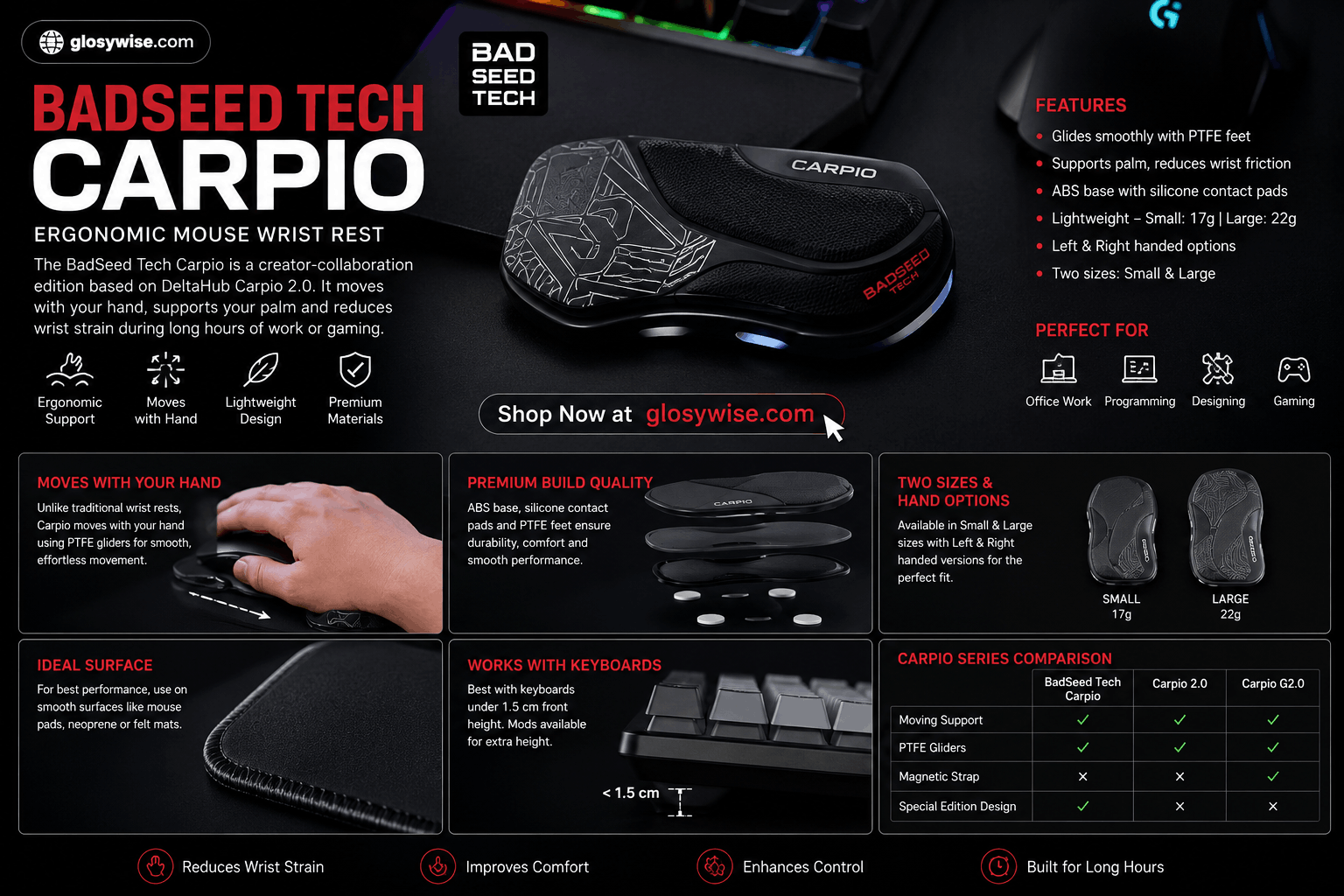
Badseed Tech Carpio: Complete Buying Guide
If you spend most of your day on a computer using a mouse — whether you’re a gamer, video editor, programmer, designer, or office professional — wrist fatigue is a problem you’ve probably run into. That’s exactly the issue Badseed Tech Carpio was built to address. It’s a creator-collaboration edition of DeltaHub’s well-known Carpio 2.0, an ergonomic mouse wrist rest developed together with popular tech reviewer BadSeed Tech.
In this guide, we’ll cover everything worth knowing about the Badseed Tech Carpio — its design, how it actually works, its features, pros and cons, and whether it’s the right pick for your setup — so you can make an informed buying decision. We’ll also look at why it feels different from a traditional wrist rest, who benefits most from it, and what to check before you order.
This article draws on publicly available product information, official DeltaHub specifications, and reviewer accounts, and is written to reflect real buying considerations rather than marketing copy.
Why Wrist Fatigue Has Become So Common
Over the last decade, daily screen time has exploded. Office work, freelancing, online gaming, and content creation all involve hours of repetitive mouse and keyboard movement. Traditional desk setups often prioritize expensive chairs and monitors while overlooking hand and wrist positioning — which is exactly the gap small but well-engineered accessories like Carpio try to fill.
What Is the Badseed Tech Carpio?
The Badseed Tech Carpio is based on DeltaHub’s Carpio 2.0 ergonomic wrist rest. Instead of sitting in one fixed spot like a foam or gel wrist pad, it rests underneath the palm and glides across the desk or mouse pad as your hand moves.
DeltaHub’s BadSeed Tech Edition includes a black Carpio 2.0 body paired with exclusive BadSeed Tech Special Edition pads. Buyers can choose left- or right-handed versions, as well as small or large sizing.
Key point: the collaboration changes the appearance and included pads, but the underlying ergonomic mechanism comes straight from the Carpio 2.0 platform. In other words, don’t expect a fundamentally different wrist-support technology — you’d choose this edition because you already want a Carpio 2.0 and like the BadSeed Tech aesthetic, which is aimed at darker, performance-focused desk setups.
Why Is the Carpio Design Getting So Much Attention?
Most traditional wrist rests are static — your wrist stays against the cushion while your hand pivots or reaches for the mouse. Carpio flips that idea. Its small platform sits beneath the heel of the hand, while low-friction PTFE feet underneath let it glide across a suitable surface. The goal is to let the hand, wrist, and arm move together instead of forcing the wrist to pivot against a fixed support.
The standard Carpio 2.0 uses an ABS plastic base, silicone contact pads, and PTFE feet. DeltaHub currently lists:
- Small version: roughly 17 grams
- Large version: roughly 22 grams
That low weight matters more than it looks. A moving wrist support only works if it doesn’t feel like you’re dragging an object around every time you move the mouse — which is why the material choice and weight balance were engineered so carefully.
Why PTFE Feet Matter
PTFE (Polytetrafluoroethylene) is the same ultra-low-friction material used in premium gaming mouse feet. That’s part of why Carpio’s glide is often compared to a high-end gaming mouse’s movement. It also wears slowly, so the smooth glide holds up over months of daily use rather than degrading quickly.
The Ergonomic Idea Behind Badseed Tech Carpio
The design is meant to support the tougher area around the base of the palm, rather than putting concentrated pressure directly under the wrist.
DeltaHub says Carpio was developed with medical input, including work with Dr. Marko Mikša, along with prototypes, 3D hand scans, and comparative MRI examinations during development. The company also states that later versions incorporated feedback from more than 20,000 users.
There’s a broader ergonomic principle behind this too. OSHA (Occupational Safety and Health Administration) recommends arranging a computer workstation so the hands, wrists, and forearms stay relatively straight and aligned. Its wrist-support guidance also notes that a support should contact the heel or palm of the hand rather than encourage constant pressure directly on the wrist.
Important: none of this means Carpio can prevent or treat carpal tunnel syndrome, repetitive strain injury, or any other medical condition. It’s an ergonomic accessory, not a medical device. Desk height, chair position, mouse placement, regular breaks, and overall posture still matter just as much.
What Ergonomics Experts Generally Agree On
No single accessory solves wrist strain on its own. A balanced workstation setup — proper chair support, correct monitor height, and regular breaks — remains the most effective approach. Tools like Carpio should be seen as one part of that broader strategy, not a standalone fix. This is exactly why responsible reviewers, and DeltaHub itself, describe it as a “support accessory” rather than a “treatment.”
Badseed Tech Carpio vs Standard Carpio 2.0 vs Carpio G2.0
Here’s where the buying decision gets much easier:
| Feature | Badseed Tech Carpio | Standard Carpio 2.0 | Carpio G2.0 |
| Core design | Moving palm/wrist support | Moving palm/wrist support | Moving palm/wrist support |
| BadSeed Tech styling | Yes | No | No |
| PTFE gliders | Yes | Yes | Yes |
| Silicone contact area | Yes | Yes | Perforated silicone pads |
| Magnetic wrist strap | No | No | Yes |
| Left/right versions | Yes | Yes | Yes |
| Small/large sizes | Yes | Yes | Yes |
| Best suited to | Work, general use, BadSeed fans | Everyday work and general use | Gaming and fast movements |
| Main reason to choose | Exclusive design | More color choices / value | Extra control during rapid movement |
The biggest functional difference isn’t between BadSeed Tech Carpio and the standard Carpio 2.0 — it’s between Carpio 2.0 and Carpio G2.0. The G2.0 adds a removable, adjustable magnetic strap designed to keep the wrist rest attached during faster movements, which DeltaHub positions specifically for gaming.
If you mainly browse, edit video, code, or use productivity software, the simpler Carpio 2.0 design makes the most sense. If you play low-sensitivity FPS games with large, rapid arm movements that regularly lift or reposition the mouse, the strapped G2.0 deserves serious consideration — for a programmer or writer, that magnetic strap won’t add much, but for a competitive FPS player it can make a real difference mid-match.
What Actually Makes the BadSeed Tech Edition Different?
The simplest way to describe it: this is a creator edition, not a new generation of the product. DeltaHub lists it as a creator collaboration featuring a black Carpio 2.0 with exclusive BadSeed Tech pads. That means the special-edition value is largely tied to design, collaboration, and the included pads — not to any new mechanism.
For buyers who follow BadSeed Tech or run a dark PC setup, that’s often reason enough. For someone interested purely in ergonomics, the regular Carpio 2.0 delivers the same core moving-wrist-rest concept. Product names can sometimes make special editions sound like an entirely separate model when they aren’t — which is worth stating clearly before you spend extra on branding alone.
Why Is BadSeed Tech Connected to Carpio?
There’s a genuine personal story behind this collaboration. According to Brian from BadSeed Tech, he initially dismissed Carpio as just another desk accessory. He began dealing with repetitive-strain problems in his right wrist during 2023, brought on by a mix of gaming, gym activity, and long editing sessions.
After noticing Carpio products in use at Linus Tech Tips, he decided to try one — and became positive enough about the results that he now gives Carpio 2.0 units to friends and family who spend significant time on a keyboard and mouse.
That backstory gives the collaboration more context than a simple logo-licensing deal, though a single individual’s experience shouldn’t be treated as medical evidence that everyone will get the same result. BadSeed Tech’s standing in the tech-review community also lends the partnership credibility — their reviews tend to focus on real-world usability, build quality, long-term durability, and value for money rather than marketing claims, which is part of why this collaboration is taken seriously rather than dismissed as a simple sponsorship.
How Does the Carpio Actually Work?
- Your palm rests naturally on the Carpio.
- As you move the mouse, the Carpio glides along with your hand.
- Pressure is distributed more evenly across the palm.
- Friction between your wrist and the desk is minimized.
This movement can feel unfamiliar if you’ve spent years on a conventional mouse pad or no wrist support at all. DeltaHub instructs users to place the palm naturally on the silicone pads rather than pressing down hard.
Expect an adjustment period rather than judging the product after five minutes. That said, discomfort shouldn’t be ignored — if you experience pain, numbness, or persistent tingling, stop using it, revisit your workstation setup, and seek professional advice if needed.
Getting the Most Out of It
- Use a light touch. Rest the palm naturally on the pads; pressing down hard hampers the glide.
- Keep the wrist straight. Try to avoid bending it, and let the Carpio do the work of following your hand.
- Ease into it. Use it for everyday tasks the first few days so your hand adapts to the new motion.
- Pair it with a good mouse. A mouse that glides well complements Carpio’s own low-friction feet.
Small habits like these make a noticeable difference in the first couple of weeks of use.
Maintenance
Cleaning is simple and doesn’t require special products:
- Wipe away light dust or dirt with a soft, dry cloth.
- For heavier grime, use mild soap and lukewarm water.
- Let the silicone pads dry fully before reuse so the glide isn’t affected.
- Avoid harsh chemicals or solvents, which can degrade the silicone surface.
Regular cleaning keeps both the look and the PTFE gliding performance intact over the long run.
Key Features
- Ergonomic support — encourages a more neutral wrist position while allowing natural movement.
- Smooth mobility — PTFE feet glide effortlessly alongside the hand instead of dragging on the desk.
- Multiple sizes — small and large options to match different hand dimensions.
- Lightweight build — stays comfortable through long sessions without feeling bulky.
- Easy maintenance — cleans up with a soft cloth, mild soap, and warm water.
- Portable design — compact enough to fit in a laptop bag or backpack.
Choosing the Right Badseed Tech Carpio Size
Sizing matters because your palm needs to sit naturally across both support areas. Here are the current Carpio 2.0 specifications:
| Size | Approximate Dimensions | Weight | Better Suited To |
| Small | 8.5 × 3.8 × 1.5 cm | 17 g | Smaller hands or users wanting more precise movement |
| Large | 9.5 × 4.5 × 1.7 cm | 22 g | Larger hands or users wanting a broader support area |
DeltaHub’s own recommendation: if you fall between sizes, a smaller option gives more control for precise movements, while a larger one offers a broader support surface for general use. Don’t default to Large just because it “sounds” more comfortable — fit matters more than raw surface area.
What Surfaces Work Best With Carpio?
The PTFE feet are designed to glide much like low-friction mouse feet. DeltaHub specifically recommends neoprene or felt desk mats, with a simple rule of thumb: if your mouse glides properly on a surface, Carpio should generally glide well too.
A smooth desk, gaming mouse pad, or quality desk mat will outperform a coarse or heavily textured surface. This is worth checking before you buy — a moving wrist rest depends on predictable movement, and a surface that constantly catches the gliders defeats much of the point.
Does Badseed Tech Carpio Work With Mechanical Keyboards?
Usually — but keyboard height matters. DeltaHub says Carpio works naturally with keyboards whose front edge sits below roughly 1.5 cm. With taller mechanical keyboards, the wrist support can end up sitting too low relative to the keys. The same issue can show up with tall vertical or ergonomic mice.
DeltaHub offers Carpio Mods that raise the wrist rest when extra height is needed, so tall-keyboard users aren’t completely locked out of the design.
Benefits of Using the Deltahub Carpio
Increased Comfort
Many users report noticeably less wrist fatigue after switching from a traditional wrist pad. The constant, moving support reduces pressure points during prolonged computer use.
Better Productivity
Comfort often leads to better focus. Whether you’re editing video, designing graphics, coding, or writing, less physical discomfort means you can stay productive for longer stretches.
Portable Design
Compact and lightweight, the Carpio fits easily into laptop bags, backpacks, or office cases — a plus for hybrid workers and anyone who travels with their setup.
Works Across a Wide Range of Users
- Office professionals
- Gamers
- Graphic designers
- CAD engineers
- Video editors
- Students
- Content creators
Anyone who spends several hours a day on a mouse is a reasonable candidate for this kind of support.
Potential Drawbacks
- Adjustment period. New users may need several days to adapt, since the Carpio moves with the wrist rather than staying put.
- Premium pricing. It costs more than a standard mouse pad or static wrist rest — though many users consider the added comfort worth it.
- Surface dependence. Very rough or textured desks can reduce the gliding experience.
Carpio vs Traditional Wrist Pads
| Feature | Deltahub Carpio | Traditional Wrist Pad |
| Moves with wrist | Yes | No |
| Reduces desk friction | Yes | Limited |
| Ergonomic support | Excellent | Moderate |
| Portability | High | Moderate |
| Learning curve | Short | None |
| Premium design | Yes | Varies |
Badseed Tech Carpio vs Other Moving Wrist Rests on the Market
A few other brands have entered the “moving wrist rest” category, but DeltaHub is widely regarded as the pioneer of the concept. Here’s how Carpio generally stacks up:
| Factor | Badseed Tech Carpio | Typical Market Alternatives |
| R&D backing | Medical input and MRI-based research | Often no clinical research behind design |
| Material quality | Premium ABS + silicone + PTFE | Varies widely |
| Brand credibility | DeltaHub + BadSeed Tech collaboration | Frequently lesser-known or newer brands |
| Community feedback | 20,000+ users referenced in development | Limited public data |
| After-sales support | Established brand backing | Inconsistent |
This isn’t to say cheaper alternatives don’t exist — they do — but Carpio’s research-backed development and long feedback history make it a more established, lower-risk pick.
Who Should Consider the Badseed Tech Carpio?
It makes the most sense for people who spend a large part of the day moving a mouse.
People Who Work Long Hours
Professionals putting in eight-plus hours a day on a mouse are likely to notice the biggest comfort improvement.
PC Gamers
Gamers on long sessions often appreciate smoother wrist movement, especially in games where fine mouse control and precision matter.
Digital Creators
Designers, photographers, video editors, and 3D artists make highly repetitive mouse movements, which makes ergonomic accessories particularly valuable for this group.
Anyone Experiencing Everyday Wrist Discomfort
Although not a medical device, Carpio may help reduce everyday wrist fatigue caused by prolonged computer use.
Who May Prefer Something Else?
Look elsewhere if you want a completely stationary padded wrist rest, dislike anything moving under your palm, or work on a very rough desk surface. Competitive gamers making aggressive, sweeping mouse movements should compare it directly with the Carpio G2.0, since its magnetic strap is specifically built to keep the support attached during intense movement.
Can Carpio Be Paired With Other Ergonomic Accessories?
Yes — and the best results often come from combining it with other ergonomic choices:
- Ergonomic mice. Pairing Carpio with a vertical or trackball mouse can further improve wrist angle.
- Adjustable keyboard trays. The right keyboard height improves compatibility with Carpio.
- Monitor stands. Correct eye-level positioning improves overall posture, which indirectly affects wrist position too.
- Quality desk mats. As covered earlier, a smooth surface is essential for good gliding.
A complete ergonomic workstation treats Carpio as one part of a broader strategy, not a standalone fix.
Common Misconceptions Buyers Should Know
“It’s just another mouse pad.” This is the most common misunderstanding. Carpio isn’t a standard mouse pad — it’s a moving wrist-support system built on an entirely different mechanism.
“Bigger is always better.” As covered above, sizing should be based on hand fit, not the assumption that a larger size is automatically more comfortable.
“It will fix all my wrist problems.” Carpio is a supportive accessory, not a cure. Overall workstation ergonomics still matters just as much.
“The BadSeed Edition is technically superior.” As explained, the BadSeed Edition mainly differs in design and branding, not in function.
Pricing and Buying Information
DeltaHub’s US storefront currently lists the standard Carpio 2.0 starting at around $34.90, with the Carpio G2.0 starting at roughly $39.90. Prices and promotions can vary by region and configuration. The BadSeed Tech Edition is generally priced close to the standard Carpio 2.0, since the difference is mostly in design and included pads rather than added functionality.
Pre-Purchase Checklist
- [ ] Measure your hand to decide between Small and Large.
- [ ] Confirm whether you need the Left- or Right-handed version.
- [ ] Check the height of your current mouse and keyboard.
- [ ] Assess your desk surface — smooth or textured?
- [ ] Decide your primary use case: general work vs. competitive gaming.
- [ ] Set a budget and choose between Carpio 2.0, the BadSeed Edition, or G2.0.
- [ ] Buy from an official store or authorized reseller to avoid counterfeits.
Is the Deltahub Carpio Worth Buying?
For anyone spending long hours at a computer, the Deltahub Carpio offers a genuinely different ergonomic approach compared to conventional wrist rests. Its gliding design, premium materials, and comfortable support make it appealing to professionals and gamers alike.
The price is higher than a standard wrist pad, but many users find the investment worthwhile given the added comfort and reduced wrist fatigue. Anyone looking to improve their workspace ergonomics may find the Carpio a genuinely useful addition — as long as expectations stay realistic about what it can and can’t do.
Frequently Asked Questions
What is Badseed Tech Carpio?
Badseed Tech Carpio is an official creator edition of DeltaHub’s Carpio 2.0 moving ergonomic wrist rest, supplied with exclusive BadSeed Tech pads and styling.
Is Badseed Tech Carpio different from the standard Carpio 2.0?
Its core ergonomic design is based on Carpio 2.0. The main differences are the collaboration styling and special-edition pads, not a new wrist-rest mechanism.
Is Badseed Tech Carpio good for gaming?
It works fine for gaming, but players making very fast or wide mouse movements may prefer the Carpio G2.0, since it includes a removable magnetic wrist strap for extra stability.
Can Carpio help with carpal tunnel syndrome?
Carpio is designed to encourage palm support and neutral wrist positioning, but it isn’t a medical treatment for carpal tunnel syndrome or persistent wrist pain, and shouldn’t be treated as one.
Does Badseed Tech Carpio work on a mouse pad?
Yes, as long as the surface allows the PTFE gliders to move smoothly. DeltaHub particularly recommends neoprene or felt desk mats.
What’s the difference between the Small and Large sizes?
The Small size weighs about 17 g and suits smaller hands or users who want more precise movement; the Large weighs about 22 g and suits bigger hands or users who prefer broader support.
Does Badseed Tech Carpio work with mechanical keyboards?
Generally yes, as long as the keyboard’s front edge sits below roughly 1.5 cm. Taller keyboards may need DeltaHub’s Carpio Mods for proper height compatibility.
How long does it take to get used to Carpio?
Most users adjust within a few days. After the first week of regular use, the moving motion typically starts to feel natural.
Does Badseed Tech Carpio work on every desk surface?
No — very rough or heavily textured surfaces can reduce glide quality. For best results, use a smooth desk, or a neoprene or felt desk mat.
Final Verdict
The clearest way to think about Badseed Tech Carpio is to separate the product from the special-edition branding. Underneath the BadSeed Tech styling is DeltaHub’s Carpio 2.0 — a compact wrist and palm support designed to glide with the hand instead of forcing the wrist against a stationary pad. That moving design is what genuinely sets it apart from conventional wrist rests.
The BadSeed Tech Edition adds personality rather than reinventing the mechanics, so it’s worth choosing if you want both the Carpio 2.0 experience and the BadSeed Tech aesthetic. For serious gaming, compare it against the strapped G2.0 first.
Before ordering, measure for the correct size, confirm whether you need a left- or right-handed version, and check your mouse or mechanical keyboard height. Those three details will affect your day-to-day experience far more than the logo on the pads.